Customer-Held Key Encryption Explained: Who Can (and Can't) See Your Data
Customer-held key encryption means a storage provider holds only unreadable ciphertext and never has the key needed to turn it back into your file, message, or password. If that provider is breached, subpoenaed, or has an employee who oversteps, there is nothing readable to hand over. Ordinary "encrypted" storage makes a weaker promise, because the provider typically generates and keeps the key itself and can decrypt your data if required to. Before trusting any tool with sensitive data, ask one question: if we store it, who holds the key?
Key takeaways
- Encryption at rest protects data sitting on a disk or server; it doesn't stop the provider itself from reading it, because the provider usually holds the key.
- "The provider never holds a key" describes an architecture. No government certification covers it; it means the provider never possesses a key that can decrypt your content.
- Key custody comes in a few common shapes: provider-held, customer-held (BYOK vs. HYOK), and split or "envelope" designs using multiple keys.
- Data encrypted today can be recorded now and decrypted later once quantum computers are capable enough, which is why post-quantum algorithms like ML-KEM are worth adopting now.
- Customer-held keys protect data in the provider's custody. They don't stop a recipient from copying a file after they've opened it, or protect a device that's already compromised.
What's the difference between encryption at rest and end-to-end encryption?
Encryption at rest means your data is scrambled while it sits on a server or disk. The National Institute of Standards and Technology (NIST) documents this approach in SP 800-111, its guide to storage encryption for end-user devices. The provider usually generates and controls that key, though, so it can decrypt the data if it's compelled to, or if an employee misuses access.
End-to-end encryption (E2EE) works differently. Data is encrypted on the sender's device and only decrypted on the recipient's device, and nothing in between, including the provider's own servers, can read it in plain form. There's no single NIST definition of E2EE the way there is for storage encryption, but the working idea is consistent across the industry: the provider carries ciphertext and never reads content.
What does it mean when the provider never holds your key?
Claims like "customer-held keys" or "we can't read your data" are industry language. NIST and regulators haven't defined them. They describe a specific property: the provider stores your data as ciphertext and never receives or holds a key that could decrypt it. That's a stronger claim than "we encrypt your data," because plenty of encrypted storage still lets the provider read the contents when it holds the key itself.
NIST's broader key-management guidance, SP 800-57 Part 1 Revision 5, lays out general principles for who can hold, protect, and use a cryptographic key. It doesn't define this kind of claim itself, but it's the underlying logic behind it. Treat the phrase as a description of an architecture. It's no badge. Any vendor using it should be able to explain, in plain terms, who generates each key, where each key lives, and under what conditions (if any) the provider could still read your data.
How it works: who holds which key
Provider-held key storage is the common default in cloud services: the provider generates the key, so it's convenient, but the provider can read your data and can be compelled to. Customer-held key models split further into two types that are easy to confuse. "Bring your own key" (BYOK) often means your key still lives inside infrastructure the provider operates, so the provider may retain technical access. "Hold your own key" (HYOK) keeps the key fully outside the provider's reach. Customer-managed isn't automatically the same as provider-can't-read-it. It depends on where the key actually sits.
A third pattern, split or "envelope" encryption, uses multiple keys that must combine before data becomes usable, so no single party's key is sufficient on its own. This is a general industry pattern (it's how services like AWS KMS wrap a data key with a master key), and it's also how SparkVault (sparkvault.com) builds its Vaults (encrypted storage, sharing links, and client uploads). SparkVault calls this Triple Zero-Trust by default: three independent keys. We hold two. You hold the third. Here's that worked example of the pattern:
| Key | Held by | Role |
|---|---|---|
| SparkVault Master Key (SVMK) | SparkVault | One of three keys combined to form a per-Vault key before a file is sealed |
| Account Master Key (AMK) | An independent FIPS 140-3 validated key management service | Second key, kept outside the provider's own infrastructure |
| Vault Master Key (VMK) | You, shown once at Vault creation | Third key. In self-managed mode, the provider never stores it and can't recover it if you lose it |
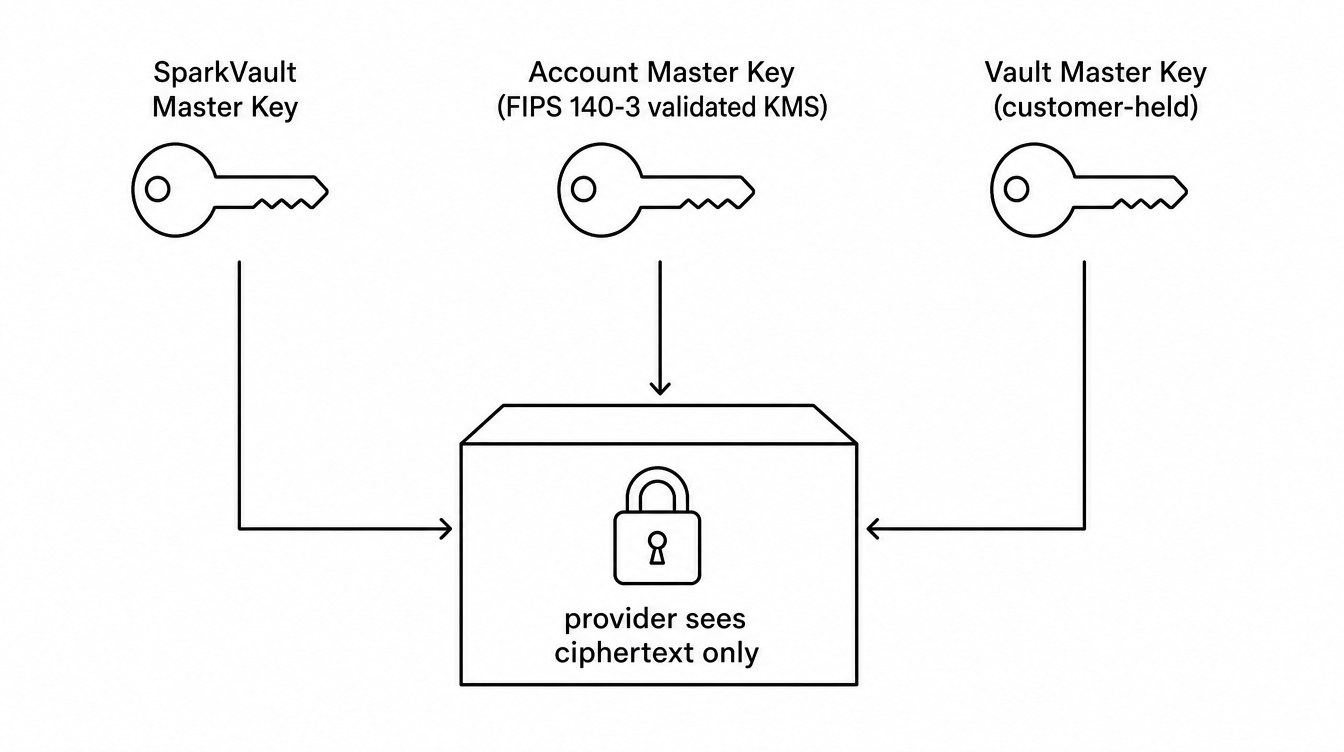
Files are sealed in 50 MB chunks using AES-256-GCM (Advanced Encryption Standard, 256-bit key, Galois/Counter Mode). That's a symmetric cipher: one key encrypts and decrypts, and the "GCM" part also checks that the data hasn't been tampered with. One caveat, stated plainly: the provider is locked out only when the Vault key is self-managed. If you choose a hosted key instead, or turn on public sharing links, the provider stores a wrapped key so those server-side functions can open the Vault, which means it can technically access that content under those settings. That's a tradeoff between convenience and the strongest privacy guarantee, and we'd prefer you know about it up front.
Try it: Set up a client upload link with a self-managed key and see for yourself what the provider can and can't access once sharing is on.
Why post-quantum encryption matters for data you're storing today
A file encrypted today with current methods could be copied and stored by an attacker now, then decrypted later once more powerful computers exist. The pattern is commonly called "harvest now, decrypt later." The Cybersecurity and Infrastructure Security Agency (CISA), the National Security Agency (NSA), and NIST put it directly in their August 2023 quantum-readiness factsheet: "cyber threat actors could be targeting data today that would still require protection in the future (or in other words, has a long secrecy lifetime), using a catch now, break later or harvest now, decrypt later operation." Neither agency has published an official date for when a quantum computer capable of breaking current encryption will exist, so treat this as a planning risk tied to how long your data needs to stay secret. There's no countdown to watch.
That's why NIST finalized Federal Information Processing Standard (FIPS) 203 in August 2024, standardizing ML-KEM (Module-Lattice-Based Key-Encapsulation Mechanism). In plain terms, ML-KEM is a method for two parties to agree on a shared secret key over the internet in a way designed to resist attacks from a future quantum computer as well as today's. It comes in three strength levels: ML-KEM-512, -768, and -1024. In the Vault example above, the key-exchange step uses the highest variant, ML-KEM-1024; AES-256-GCM still handles encrypting the actual file bytes. If your data needs to stay confidential for years (medical records, legal files, long-term contracts), the key-exchange method is worth getting right now, even though the bulk cipher isn't the weak point.
Safer ways to send and store sensitive data
Before reaching for any tool, it helps to compare what actually happens to a file or credential under each common method.
| Method | Who can read it | How long it persists | Effort |
|---|---|---|---|
| Email attachment | Provider, anyone with mailbox access, and anyone it's forwarded to | Indefinitely, in every inbox it touched | Low |
| Consumer cloud share link | Provider, plus anyone who has or finds the link | Until manually deleted | Low-medium |
| Encrypted storage, provider-held key | Provider can decrypt if required to | Until deleted | Low |
| Encrypted storage, self-managed key | Provider cannot decrypt | Until deleted; lost key means lost access | Medium |
| One-time encrypted delivery (burn after read) | Only the person who opens it, once | Expires automatically; no persistent copy | Low |
A vendor-neutral option for a one-off secret, like a wire confirmation code, is to read it to the recipient over a phone call instead of putting it in writing at all, or to use a password manager's built-in secure-sharing feature if your team already has one. If you don't already have a tool for one-time delivery, a burn-after-read link works the same way in principle. SparkVault's Sparks let you send text, a file, or a link as a one-time delivery (up to 256,000 bytes, with a lifetime from one minute to 24 hours), and the link burns after the first time it's opened.
What customer-held keys don't protect against
A customer-held key design changes what the provider can see. It doesn't change what happens after a legitimate recipient opens the content. Once someone decrypts a file on their own device, they can screenshot it, download it, forward it, or print it; the architecture governs the provider's access and leaves the recipient's untouched.
It also doesn't help if the sender's or recipient's device is already compromised. Malware, a stolen laptop left signed in, or a phone with no screen lock lets an attacker read data the same way the legitimate user does, because decryption happens on that device. And it doesn't fix a weak or reused password: if the key or account is protected by a guessable credential, an attacker who obtains it can authenticate as the key-holder. In that case the weak point is the credential, and the cryptography holds up fine. Customer-held keys also typically cover content, and not necessarily metadata like file names, sizes, or who sent what to whom, so don't assume everything about a transfer is hidden just because the contents are.
For larger teams
Security and IT leads evaluating this for a company need a few more answers than "is it encrypted." Ask any vendor: which key custody model applies by default versus which requires an opt-in (self-managed versus hosted keys, as above); what happens on offboarding if an employee held a key or delegated access; whether admin and audit logs show access attempts without exposing content; and what the procurement or security-review documentation actually confirms versus what's marketing language. Don't accept an unverified certification claim as a substitute for reading the actual architecture documentation. Use the level of detail in this article's "How it works" section as a template for what a vendor should be able to explain about its own system.
Common questions
Is customer-held key encryption the same as a certified security standard?
No. It's an architecture description used across the industry. No government has made it a standard or a certification. NIST and CISA publish standards for specific building blocks (like FIPS 203 for ML-KEM), but there's no official certification for "the provider can't read your data" to look for.
Can storage with customer-held keys be hacked?
No storage method is unhackable. Customer-held key design limits what an attacker gets if the provider's servers are breached, because there's no usable key sitting there to steal alongside the ciphertext. It doesn't remove every risk. A compromised device or stolen credential can still expose the data.
What happens if I lose my own key?
In a self-managed key model, the provider never stored a copy and can't recover it for you. Nobody else can read your data, including the provider, and the flip side is that nobody else can rescue it if the key is lost.
Does post-quantum encryption matter if quantum computers that can break current encryption don't exist yet?
It counts for data with a long secrecy lifetime. CISA, the NSA, and NIST warn that data encrypted today can be captured now and decrypted later once the capability exists; their August 2023 factsheet calls this "harvest now, decrypt later." Neither agency has set a date for when that becomes possible, which is exactly why planning starts before it does.
What's the difference between BYOK and HYOK?
"Bring your own key" (BYOK) often means your key is still managed inside infrastructure the provider operates, so the provider may retain some technical access. "Hold your own key" (HYOK) keeps the key fully outside the provider's reach. The names sound similar, but only one of them keeps the provider from ever holding a usable key.
Sources
- NIST FIPS 203: Module-Lattice-Based Key-Encapsulation Mechanism Standard (August 2024)
- NIST Post-Quantum Cryptography Project
- CISA, NSA, and NIST: Quantum-Readiness: Migration to Post-Quantum Cryptography (August 2023)
- NIST SP 800-57 Part 1 Rev. 5: Recommendation for Key Management
- NIST SP 800-111: Guide to Storage Encryption Technologies for End User Devices
- SparkVault: Secure File Storage documentation
Last updated / checked on: November 2025.
Fact-checked and edited by the SparkVault Editorial Team.
If you need to send a one-time secret today, send it as a free Spark that burns after the first read, or set up a client upload link with a self-managed key.