Encryption in Transit vs At Rest vs End-to-End: What Each One Protects (and What It Doesn't)
Encryption in transit protects data while it moves between devices, encryption at rest protects it while it is stored, and end-to-end encryption keeps it unreadable to the service in the middle. Ask who holds the key and when the data is decrypted to understand what a product's 'encrypted' label covers. How long the data persists determines what is left to steal or forward.
Key takeaways
- Encryption in transit covers the wire. A server that ends the connection still sees the plain file.
- Encryption at rest covers stolen disks and database copies. Whoever holds the key can still read the data.
- In the common vendor sense, end-to-end encryption means only the sender's and recipient's devices hold the keys. Check the vendor's documentation before you assume it.
- No layer stops screenshots, saved copies, forwarding or a compromised device. A short lifetime reduces how much is left to exploit.
Take a six-person design firm that needs to send a signed contract to a client. The PDF sits on a laptop, travels across the internet, lands on a provider's server and is opened on the client's screen. Each of those four moments has its own protection, its own key holder and its own gap. A product page that says only 'encrypted' rarely tells you which moments it covers.
What do encryption in transit, at rest and end-to-end each protect?
Encryption scrambles data so it is unreadable without a key. The three terms describe where that scrambling applies, and the key holder decides who can undo it.
| Layer | Where it applies | Who holds the key | Who can read the data | What it does not cover |
|---|---|---|---|---|
| In transit | Between a device and a server, usually TLS (Transport Layer Security, the protocol behind the browser padlock) | The two endpoints, set up fresh for each session | The two endpoints only | The server decrypts on arrival. TLS does not hide the length of what is sent. |
| At rest | Disks, databases and backups | Usually the provider, sometimes the customer | Whoever holds the key, plus anyone who obtains it | Provider staff and systems with access, and any account that is logged in |
| End-to-end | From the sender's device to the recipient's device | Only the sender's and recipient's devices | The sender and the recipient | Compromised devices, copies, forwarding and some metadata |
What does encryption in transit cover?
The TLS specification describes the protocol as 'designed to prevent eavesdropping, tampering, and message forgery' between a client and a server. Data sent over the channel is visible only to the two endpoints. TLS 1.3 is now defined in RFC 9846 (July 2026), which obsoletes the original RFC 8446 from 2018 and keeps the same version number. NIST SP 800-52 Rev. 2 covers how to select and configure TLS. As of November 2026, NIST lists it as under review.
The server is an endpoint. If it ends the TLS connection, it holds the plain file at that moment. That is why in transit does not mean end-to-end.
What does encryption at rest cover?
Encryption at rest protects stored data. NIST SP 800-111 describes three approaches for end-user devices: full disk, volume or virtual disk, and file or folder encryption. It was published in 2007 and covers laptops, phones and removable media. Its scope is end-user devices, making it a reference for the laptop at the first stage of the contract.
For provider storage, the label alone says little. If the provider holds the key, encryption at rest protects against a stolen drive or a copied database. It does not stop the provider, or someone who takes over a provider admin account, from reading the file.
What does end-to-end encryption mean?
In the common vendor sense, end-to-end means the keys live only on the sender's and recipient's devices, so the service in between cannot read the content. NIST's glossary uses an older, network-focused definition: data is encrypted while it passes through a network, but routing information remains visible. That wording does not say the provider cannot read the data. It does show that metadata, such as who is sending to whom, can stay visible even when content is encrypted. When a vendor says end-to-end, ask which meaning it intends.
For a longer look at what it means when a provider says it cannot read your data, see our encryption explainer listed under related reading below.
Where does a contract get exposed along the way?
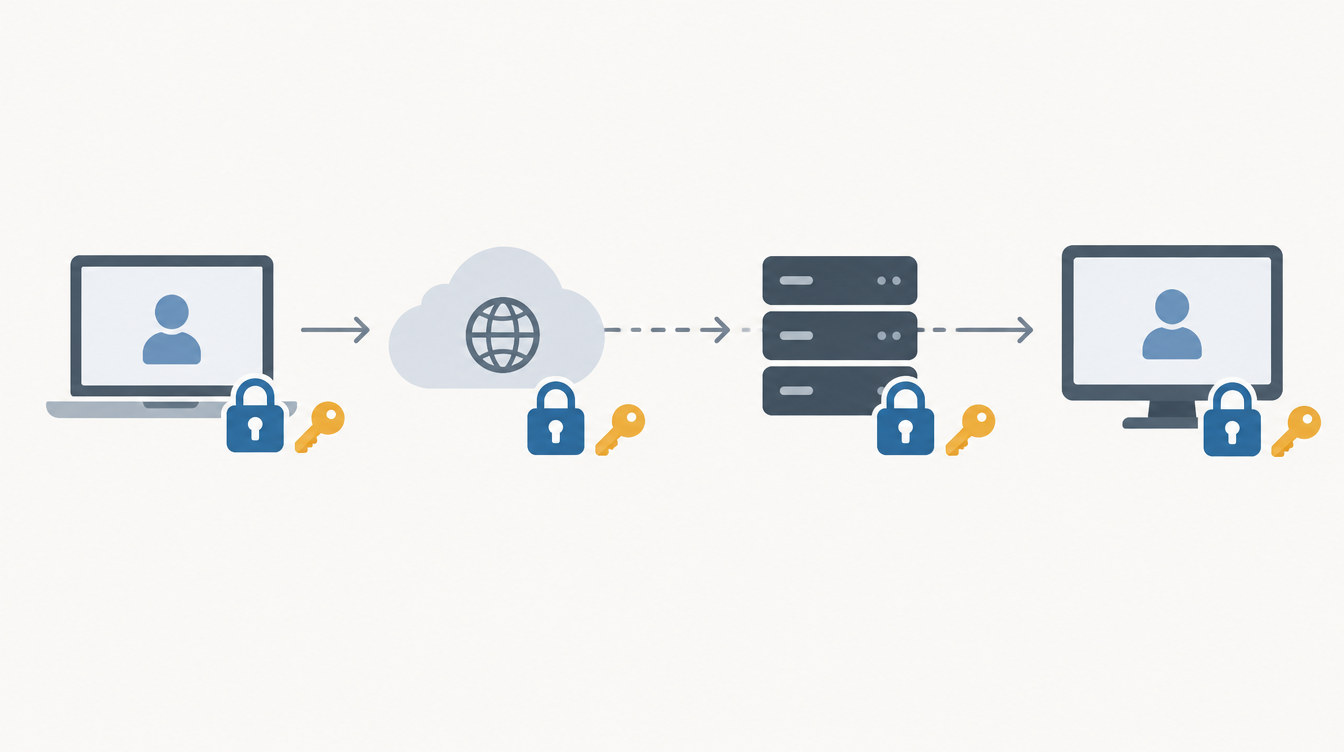
| Stage | Protection that applies | Who holds the key | Who can read it | Where protection ends |
|---|---|---|---|---|
| Leaving the laptop | Disk encryption | Device owner or operating system | Anyone logged in or with the unlock | An unlocked or compromised device |
| Crossing the network | TLS | The two endpoints, per session | The two endpoints only | The server decrypts on arrival. Email hops may fall back to unencrypted delivery. |
| On the provider's server | Encryption at rest | Usually the provider | The provider, and anyone who gets the keys | Provider access, admin accounts, hacked accounts |
| Opening on the client's device | End-to-end encryption, or none | The recipient's device | The recipient, or whoever has their device or account | Screenshots, saved copies, forwarding, a compromised device |
Is email encrypted in transit?
Often, but with gaps. Mail servers commonly use STARTTLS to negotiate a TLS channel between each other. RFC 8461 says this opportunistic encryption gives a high barrier against passive interception. It also says an attacker who can strip the STARTTLS offer or redirect the session can perform downgrade or interception attacks. The mailbox providers at each end can also read the message. Email is often encrypted hop by hop, and that coverage is not guaranteed.
How do the layers close each other's gaps?
Each layer answers a different threat, so they work as a set.
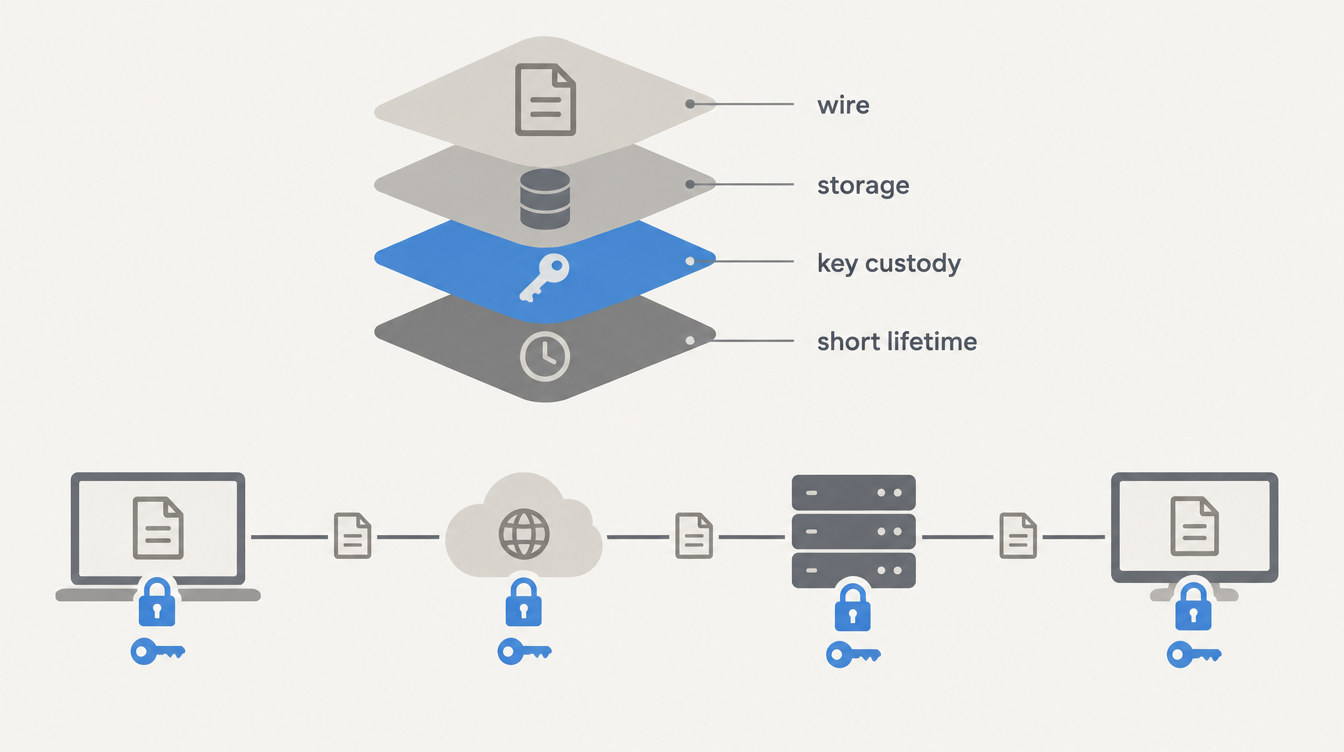
- TLS on the wire stops anyone on the network path from reading the file in motion.
- Encrypted storage means a stolen disk or database copy is unreadable on its own.
- Key custody decides who can read the data. Separate keys for the data, the account and the person who unlocks it mean no single key opens everything.
- A short lifetime limits how long a copy exists to be forwarded, retained or found in an old mailbox.
How can you send the contract with a short lifetime?
One option is a one-time link. SparkVault (sparkvault.com) sends text, files or links as a one-time Spark: up to 256,000 bytes, a lifetime from 1 minute to 24 hours, destroyed on the first read. As of November 2026, its documentation says each Spark is sealed with AES-256-GCM (Advanced Encryption Standard in Galois/Counter Mode, a widely used cipher that also detects tampering) under its own key. The platform key is an ML-KEM-1024 keypair, a post-quantum key-encapsulation scheme from FIPS 203. The account key sits in FIPS 140-3 validated hardware, which means a cryptographic module checked against a government standard. A click-to-view step means a link scanner that loads the page does not burn the Spark.
On custody: opening a Spark takes two keys. SparkVault holds one, and the other is held in tamper-resistant hardware. The customer holds no key, so a Spark is a layered design and is not end-to-end encrypted. The size limit is about 250 KB, so a contract PDF with scanned pages may not fit. Check the file size first.
Other methods suit different situations. This table compares them, including options that use customer-held keys.
| Method | Who can read it | How long it persists | Effort |
|---|---|---|---|
| Email attachment | You, the recipient, the mail providers, and anyone with access to either mailbox | Until deleted from every mailbox and backup | Low |
| Consumer cloud link | The provider, plus anyone with the link, depending on sharing settings | Until the link is revoked or the file is deleted | Low |
| Password manager secure share | You and the recipient, if the vendor documents end-to-end encryption. Check its docs. | Depends on the vendor's settings | Medium |
| Encrypted file plus passphrase by phone | Anyone who has both the file and the passphrase | The file stays wherever it was stored | Medium |
| One-time link (for example, a Spark) | The recipient who opens the link. The service holds one of two required keys. | Until first read, or the lifetime you set, up to 24 hours | Low |
What does encryption not protect against?
Encryption keeps out people who lack the key. The threats below involve people or devices that already have access.
- Screenshots and saved copies. Once the recipient sees the file, they can copy it. Burning a one-time link does not erase copies, screenshots or content shared through another app.
- Compromised devices. Malware on the recipient's laptop sees what the recipient sees, whatever the transport.
- Account takeover. If someone controls the recipient's mailbox, they can open the link first or read a message sent to that address.
- Forwarding. A permanent attachment can be forwarded indefinitely. A one-time link can be forwarded until it is opened.
- Link scanners. Security tools that open links in advance can use up a one-time link. A click-to-view step prevents this.
- Phishing requests. A fake request for the contract or for payment details gets a sincere answer sent to the wrong person. Confirm unusual requests by phone.
What should you tell the recipient?
Recipients sometimes open one-time links on a phone they cannot save from, or at a bad moment. A short note prevents the 'already viewed' problem:
This link opens once and then expires. Please open it when you are ready to save what you need.
What should you ask any vendor?
Use this worksheet on any product page that says 'encrypted'.
| Question | A clear answer sounds like | A vague answer sounds like |
|---|---|---|
| 1. Who holds the key? | Names who generates it, where it is stored, and whether the provider can use it | 'Industry standard encryption' |
| 2. When is the data decrypted? | States when plain data exists on the server, if ever, and on which device it is decrypted | 'Always encrypted' with no stage named |
| 3. How long does it persist? | Gives a retention period, deletion behavior and backup handling | 'Stored securely' |
For larger teams: what should policy and procurement ask?
Security, IT and finance-ops teams need wording that survives a vendor questionnaire and an audit.
Policy wording
Avoid requiring 'encryption' alone. A sample clause: 'Regulated attachments must be shared using customer-controlled keys or a one-time delivery method with a documented maximum lifetime. Customer-controlled means the organization, and not the vendor, can revoke or rotate the key.' Define the term in the policy itself.
Key management, logging and exceptions
- Key management: who generates keys, where they are stored (a hardware security module, or HSM, and which FIPS 140-3 level), the rotation schedule, and what happens on revocation or a lost key.
- Audit logging: who opened or accessed an item, when, and how long the logs are kept.
- Exceptions: name who approves a deviation, record the reason, and set an expiry date for it.
Five vendor questions
- Who holds the keys for stored data, and can your staff use them?
- At what points is plain data present on your servers?
- What are your retention and deletion rules, including backups?
- Who has administrative or insider access, and how is it logged?
- What is your post-quantum plan: which algorithm, and does it follow a standard such as FIPS 203?
Encryption of customer information also comes up in regulatory guidance. Our FTC Safeguards Rule guide for small financial businesses, listed below, covers that angle.
FAQ
Is email encrypted?
Often in transit, but not always. Mail servers commonly negotiate TLS with each other, but RFC 8461 notes that an attacker who can strip the offer can force a downgrade. The mailbox providers at each end can also read the message.
Is cloud storage end-to-end encrypted?
It depends on the service. Encryption in transit and at rest with provider-held keys is not end-to-end. A service is end-to-end only if its documentation says the keys stay on your devices.
Does encryption at rest stop the provider reading my files?
Only if the provider does not hold the key. Encryption at rest protects against stolen disks and database copies. To learn whether the provider can read your files, ask who holds the key.
What is post-quantum encryption, and do I need it now?
Post-quantum encryption uses algorithms built to resist quantum computers. NIST published FIPS 203 on August 13, 2024. It specifies ML-KEM (Module-Lattice-Based Key-Encapsulation Mechanism), a way to agree on or wrap a secret key. Its abstract says ML-KEM is believed to be secure even against adversaries with a quantum computer. Data copied today could be decrypted later, so the question may matter most for long-lived secrets such as contracts and identity documents. Ask vendors for their plan.
Can encrypted files still be forwarded?
Yes. Encryption controls who can read the file in storage or transit. It does not control what an authorized recipient does with it. A short lifetime and a one-time link reduce the window, but the recipient can still save or share what they see.
Related reading
- Secure Data: our category guide to sharing sensitive information safely
- Our explainer on who can and can't see your data when a provider says it cannot read your files
- Secure Data Sharing Checklist: What to Check Before You Send Anything Sensitive
- What the FTC Safeguards Rule Requires: A Compliance Guide for Small Financial Businesses
When you are ready to send the contract, send it as a one-time Spark, free: paste the text or attach the file, set it to expire in an hour, and share the link.
Sources
- NIST FIPS 203, Module-Lattice-Based Key-Encapsulation Mechanism Standard
- NIST SP 800-52 Rev. 2, Guidelines for the Selection, Configuration, and Use of TLS Implementations
- NIST SP 800-111, Guide to Storage Encryption Technologies for End User Devices
- RFC 9846, The Transport Layer Security (TLS) Protocol Version 1.3
- RFC 8446, TLS 1.3 (obsoleted by RFC 9846)
- RFC 8461, SMTP MTA Strict Transport Security
- NIST CSRC Glossary: end-to-end encryption
- SparkVault (sparkvault.com) secret sharing page