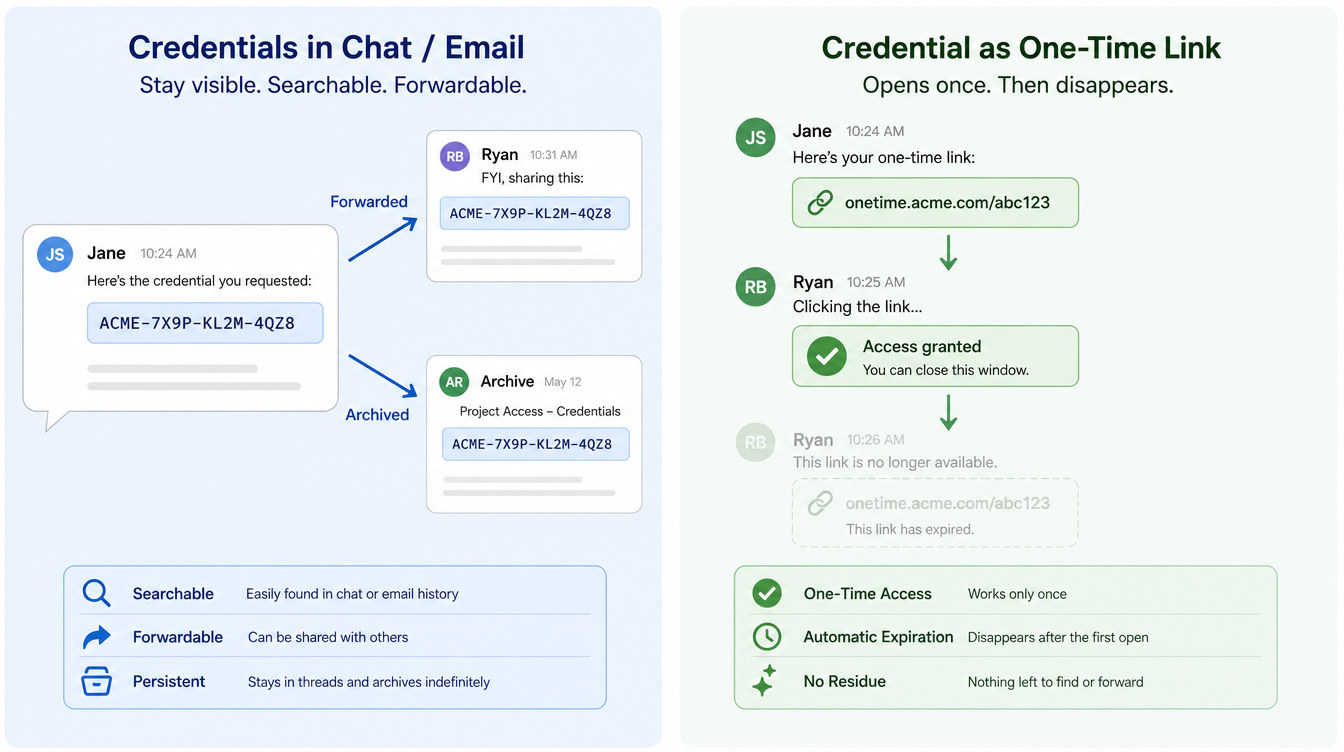
How to Share API Keys and Credentials Securely
The safest way to hand a teammate or contractor an API key, database password, or vendor credential is to send it once, let it expire on its own, and keep it out of any channel that keeps permanent, searchable history. For a one-off handoff, use a password manager's secure-share feature or a one-time link. For ongoing or shared access, put the credential in a secrets manager so nobody has to retype it every time someone needs it. Either way, treat a credential as compromised the moment it's been pasted into chat or email, and rotate it.
Key takeaways
- Chat and email keep credentials searchable indefinitely, through forwarded copies, backups, and anyone who later gains access to the account.
- For a one-time handoff, a password manager's secure-share feature or a one-time link is lower effort than setting up shared infrastructure.
- For ongoing or shared access, a secrets manager with scoped permissions beats retyping a credential into a new message each time.
- Phone or verbal confirmation works well to verify identity or confirm a short code, but it's not practical for transmitting a long key string.
- No delivery method stops a recipient from screenshotting, copying, or pasting a credential somewhere less secure after they've read it.
Why are chat and email risky for sharing credentials?
Chat threads and email inboxes don't forget. A credential typed into a direct message or email body stays there, searchable, until every copy is deleted, including forwarded copies, sent-folder copies, and backups you don't directly control. Anyone who later gets access to that inbox or workspace, whether it's a new hire added to a shared mailbox, a compromised account, or a departing employee's old forwarding rule, can read a credential months after the original handoff.
The U.S. Cybersecurity and Infrastructure Security Agency (CISA) has made a related point about saved passwords: anyone with access to a device or account can often find credentials that were never meant to stay there (CISA, Choosing and Protecting Passwords). The same logic applies to a key sitting in a chat log. Chat and email are fine for most work. Just stop using them for the one piece of information that still works after the conversation is over.
What are safer ways to share a credential?
Picture a small accounting firm handing a contractor the API key for a third-party payroll integration, or an IT team provisioning a vendor's service account for a new engineer. Neither case calls for the key to live permanently in chat history or an email thread. Here's how the common options compare.
| Method | Who can read it | How long it persists | Effort |
|---|---|---|---|
| Chat or email | Anyone with inbox, workspace, or export access, including people added long after the handoff | Indefinite, through searchable history and backups | Lowest |
| Password manager secure share | Only the recipient, for the window you set | Minutes to days, depending on the expiration you configure | Low |
| Secrets manager or vault | Only people or services explicitly granted access | Persists until rotated or revoked (ongoing and managed) | Medium to high (needs setup and integration) |
| Phone or verbal confirmation | Only the person on the call, at that moment | Not persisted by the call itself, but the key still has to travel some other way for the recipient to use it | Low per use, doesn't scale |
| One-time link | The recipient who opens it once; the link stops working after that | Expires automatically within a window you set | Low |
Phone or verbal confirmation deserves a caveat. It's good for verifying identity or reading back a short code, and it's impractical for dictating a 40-character API key. Use it to confirm you're sending the right person the right thing, and send the credential itself some other way.
Step by step: hand off a credential without leaving it behind
- Generate the actual credential. Create the real API key, service account password, or database credential you're handing off. Skip placeholders you'd have to edit later.
- Decide if this is a one-off handoff or ongoing access. A contractor who needs a vendor API key for a single project is a one-off. A new employee who needs standing access to a shared service account is ongoing.
- For a one-off handoff, use a password manager share or a one-time link. If you already use a password manager with a secure-share feature, send it from there. If you don't, a one-time link works: paste the credential as a Spark in SparkVault (sparkvault.com), set it to expire within an hour, and send the link. The text burns the moment it's read, so it never sits in your sent folder or the recipient's inbox (SparkVault's one-time secret sharing).
- For ongoing access, add the credential to a secrets manager instead. Grant the specific person or service scoped permissions so the raw value never travels by message. CISA's joint guidance recommends storing credentials in a secrets manager and using encrypted communication in place of plaintext channels (CISA Advisory AA25-212A).
- Confirm receipt through a separate channel. A quick "got it" in chat or a short call confirms delivery without retransmitting the secret itself.
- Rotate the credential if it was ever typed into chat or email first. If someone pasted the key into a message before you caught it, assume it's exposed and issue a new one. Deleting the message isn't enough.
What to tell your recipient
A one-time link only works as intended if the person opening it knows the rules. A short note like this covers it: "This link opens once and then stops working. Copy the key straight into your password manager or secrets manager, don't leave it in a clipboard, a sticky note, or a text file. Please don't screenshot it or forward the link."
For larger teams
A repeatable process matters more than any single tool once you're managing dozens of vendor keys and service accounts across a team.
- Rotation policy: NIST SP 800-57 Part 1 Revision 5 recommends defining a fixed usage lifetime, called a cryptoperiod, for cryptographic keys and credentials so they don't stay active indefinitely (NIST SP 800-57 Part 1 Rev. 5). Set a rotation schedule for vendor API keys even when nothing has gone wrong.
- Secrets manager integration: Route ongoing service credentials through a secrets manager with scoped, per-service access. Keep them out of shared documents and spreadsheets.
- Audit logs: Keep a record of who accessed or received which credential and when, separate from the credential itself, so you can answer "who had this key" during an incident review.
- Offboarding checklist: When someone leaves or a contractor's engagement ends, revoke their access and rotate any credential they could have seen. Don't count on them forgetting it.
- Exceptions for one-off vendor keys: Not every credential justifies full secrets-manager integration. Document a lightweight, approved exception process, such as a one-time link with a short expiration, for real ad hoc vendor handoffs, so staff aren't tempted to default back to email when the full process feels like too much.
What a one-time link doesn't protect against
A one-time link, a password manager share, or a secrets manager all reduce how long a credential is exposed and who can reach it. None of them stop a person from doing something risky with it after they've seen it. These methods don't protect against:
- The recipient taking a screenshot or writing the credential down before or as it displays.
- The recipient pasting the credential into a less secure location afterward, like a plain text file or an unencrypted note app.
- A compromised device, or one left signed in and unattended, at the moment the recipient opens the link.
- Someone reading the screen over the recipient's shoulder.
Reducing exposure time and audience is still worth doing. It just isn't a substitute for the recipient handling the secret carefully once they have it.
Frequently asked questions
How do I send a password without using email?
Use your password manager's secure-share feature if it has one, or send it as a one-time link that expires after a single view. Both keep the password out of your sent folder and the recipient's inbox.
What's the difference between a secrets manager and a one-time link?
A secrets manager is built for ongoing, managed access: a service or person keeps using the credential until it's rotated or their access is revoked. A one-time link is for a single handoff, existing just long enough for one person to read it once before it's gone.
Should I rotate a key after sharing it this way?
If the credential only ever traveled through a password manager share, secrets manager, or one-time link, rotation isn't automatically required. If it was ever typed into chat or email first, even briefly, rotate it, since you can't be certain every copy of that message is gone.
What if the recipient needs the credential again later?
For a one-off vendor key, send it again the same way. For anything used more than once, move it into a secrets manager so the recipient has standing, scoped access and doesn't have to ask you to resend it each time.
Is a one-time link enough for a production database password?
It's fine for the initial handoff. A production credential that multiple people or services rely on belongs in a secrets manager with scoped access and a rotation schedule, and a single one-time share won't cover that.
If you don't already have a secrets manager set up for ad hoc vendor keys, send the credential as a one-time Spark, free. It burns after the first read: send a one-time Spark.
Sources
- CISA, Choosing and Protecting Passwords
- CISA Advisory AA25-212A
- NIST SP 800-63B-4
- NIST SP 800-57 Part 1 Rev. 5
- SparkVault
Last updated: December 2025.