You Sent Sensitive Data to the Wrong Person: What to Do in the First Hour
If you just sent a password, a file, or a link to the wrong person, start by checking whether it's already been opened. That determines almost everything else you do next. If it's still unopened, you can often revoke access before anyone sees it. If it's already been read or downloaded, shift from trying to stop access to limiting the damage: rotate whatever was exposed, ask the recipient to delete it, and decide who else needs to know.
Key takeaways
- Check first whether the link or file has actually been opened. That fact decides which steps will actually help.
- Outlook's recall feature only works if both accounts are on the same Microsoft 365 organization and the message hasn't been read yet. For most mis-sends (a personal Gmail address, a different company, a phone that already synced), it won't apply.
- Revoking a shared link in Google Drive, Dropbox, or OneDrive stops future access. It does not erase anything the recipient already viewed, downloaded, or copied.
- Rotate exposed passwords, API keys, or account numbers right away. Don't wait to confirm whether the recipient opened the message first.
- Once something's been read, you're relying on the recipient to delete it. No technical control can do that part. One-time, expiring delivery avoids this exact problem for the next thing you send.
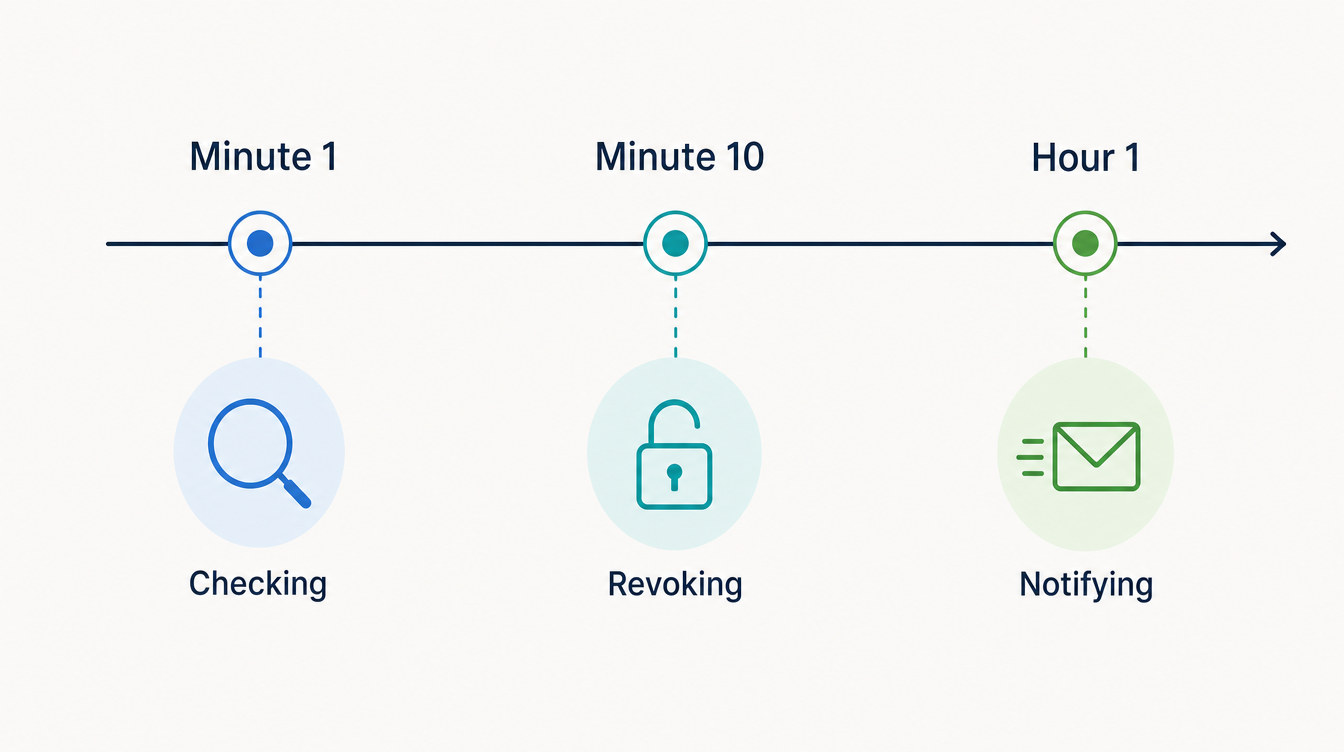
The first few minutes: find out if it's been opened
Stop forwarding the item, discussing it further in the same channel, or sending a hurried correction. Each of those creates more copies of the same mistake. Check what you actually have access to: a delivery or read receipt, a cloud drive's activity log if the platform shows one, or just whether the recipient has replied.
If you're on Outlook and both you and the recipient are on the same Microsoft 365 organization, you can try a recall. Microsoft is explicit that it only works before the recipient opens the message, and it fails without any warning in a lot of ordinary cases: a different organization, a personal account, a mobile client, or a rule that already moved or previewed the message (Microsoft's recall requirements and limitations). Across organizations, or on Gmail, Yahoo, or any IMAP account, there's no recall option at all. Treat this as a narrow exception. It shouldn't be your first move.
Within 10 minutes: revoke access and rotate what's exposed
Cloud links and shared folders
If you shared through a cloud drive, go straight to the sharing settings and remove the link or that person's access. In Google Drive, you can switch a file from "Anyone with the link" back to restricted, or remove an individual's access, from the Share dialog at any time (Google's sharing controls documentation). Dropbox and OneDrive have equivalent "manage access" or "stop sharing" controls in their own sharing settings. The labels vary, but the action is the same. This stops anyone from opening the link going forward. It does not undo a view or download that already happened.
Passwords, API keys, and account numbers
If what you sent was a credential (a password, an API key, a wire routing number, a database connection string), go directly to the system that issued it and rotate or revoke it there. Most cloud platforms let you roll or disable a key from their own dashboard in under a minute. Do this regardless of whether you think the recipient opened the message. Assume a credential that might have been seen has been seen.
Within the hour: tell the recipient and loop in the right people
Send the recipient a short, factual message. You're not accusing them of anything. You're asking for one specific, easy action.
Template, adjust the specifics: "Hi [name], I sent you [document/link] by mistake a few minutes ago. It was meant for someone else and contains information that isn't for general distribution. Could you delete it and let me know once you have? No need to open or forward it first. Happy to answer any questions; you can reach me at [phone/email]."
If your organization has a manager, IT contact, or security alias for this kind of thing, tell them now. Don't wait until you've decided whether it "counts." Someone with more context than you (on contract terms, what the data actually was, or legal exposure) should make that call, and the person who sent it is usually the wrong one.
What's recoverable and what isn't
| Situation | Can you stop access? | What's still at risk |
|---|---|---|
| Unopened cloud link | Yes, revoke access before it's clicked | Nothing yet, if you're fast |
| Opened cloud link, no download | No, the view already happened | Recipient saw the content; may have screenshotted it |
| File attachment already downloaded | No | A local copy exists outside your control |
| Password, API key, or account number sent | Rotate it; revoking access doesn't change the value | The old credential works until you change it |
| Screenshot or copy taken | No | Depends entirely on the recipient's cooperation |
What you can't undo
Revoking a link, recalling a message, or deleting a one-time secret after it's been read all do the same kind of thing: they stop the system from serving the content again. None of them reach into a screenshot the recipient already took, a copy pasted into another document, or a message a connected chat tool already displayed and logged. SparkVault (sparkvault.com) documents this limit directly: burning a Spark destroys it on the service's end, but it doesn't erase a copy the recipient made elsewhere (see the documentation). That limit applies to every method of sending something, whatever the tool. Once content has been displayed on a screen, technical controls hand off to human cooperation.
For larger teams: who decides to notify, and when
The person who made the mistake usually isn't the right person to decide whether a client, regulator, or affected individual needs to be told. That decision typically belongs to legal, compliance, or a designated incident owner, because it depends on facts the sender may not have: what the data actually was, what the contract says, and what jurisdiction applies. Set up, in advance, a single place to report a mis-send (a security alias, an incident form, or a named contact) so nobody has to send an ad hoc message to whoever's online. What a specific regulation requires in terms of timing and who must be told depends on your situation and the type of data involved; that's a separate question from the triage steps above. If you suspect the wrong recipient is involved in an active scam or fraud attempt, the FBI's Internet Crime Complaint Center takes reports directly, and CISA accepts voluntary reports of cyber incidents from organizations (FBI IC3 complaint intake, CISA's Shields Up reporting guidance).
How one-time delivery prevents this exact mistake next time
A lot of this incident exists because the original send was permanent: an attachment that lives in an inbox forever, or a link that stays open until someone remembers to close it. A one-time link that expires removes that window. If you don't already have a tool for this, your password manager's secure-share feature is a vendor-neutral option for passwords and short secrets. For files, text, or links you want to send once and have disappear automatically, SparkVault sends up to 256,000 bytes as a Spark that lives from one minute to 24 hours and is destroyed the moment it's read. An unread Spark just expires, and a second attempt to open it shows "no longer available" instead of the content. Decryption requires a post-quantum key held by the service plus your own account key, so the provider states it can't read the contents with database access alone (per its documentation). It won't fix a mistake you already made, but it closes the exact window this article is about, from "I sent it" to "it's still sitting there, readable, indefinitely."
Frequently asked questions
Can I recall an email once it's sent?
Only in narrow cases. Outlook's recall feature works solely when both you and the recipient are on the same Microsoft 365 organization and the recipient hasn't opened the message yet (Microsoft's recall requirements and limitations). It doesn't work across organizations, with Gmail or other non-Exchange accounts, or once the message has been read or processed by a rule. For most mis-sends, don't count on it.
Does revoking a shared link erase what the recipient already saw?
No. Revoking access in Google Drive or a similar cloud drive stops anyone from opening the link going forward, but it doesn't remove anything already viewed, downloaded, or copied before you revoked it (Google's sharing controls documentation). Treat revocation as damage control. It won't reset anything.
Is accidentally sending sensitive data to the wrong person a reportable breach?
It depends on your jurisdiction, the type of data, and any contract terms. There's no single universal rule, so decide that question with legal or compliance (don't guess), and treat the triage steps above as separate from the notification decision.
Should I rotate a password or API key even if I'm not sure the recipient opened it?
Yes. Rotating a credential is quick, and waiting to confirm whether someone opened a message before you act just extends the window where the old credential still works. Go to the system that issued the credential and roll or disable it there.
What should I say to the person who received it by mistake?
Keep it short, specific, and non-accusatory: name what you sent, ask them to delete it without opening or forwarding it further, and give them a way to reach you with questions. A template is in the "within the hour" section above.
Sources
- Microsoft Support: How to recall an email in Outlook
- Google Drive Help: Stop, limit, or change sharing
- CISA: Shields Up
- FBI Internet Crime Complaint Center (IC3)
- SparkVault: Secret sharing documentation
Last updated: June 2025.
fact-checked and edited by the SparkVault Editorial Team.
If you want a safer default for the next sensitive file or password you send, send it as a one-time Spark, free.