If someone tells you a secure, one-time link said "already viewed" or "already used" before they ever clicked it, the link almost certainly wasn't opened by a person. Corporate email security tools and chat link-preview bots routinely fetch every URL in a message automatically, to check it isn't malicious before it reaches the inbox or gets previewed. A one-time link that burns itself on the first page load has no way to tell that automated visit apart from a real click, so the scanner's visit uses it up.
Key takeaways
- Email security scanners and link-preview bots open URLs automatically to check for malware, often before a human ever sees the message.
- A one-time link that releases its contents on the first page load can't distinguish a bot's visit from a real click, so the scanner's visit burns it.
- This is routine behavior from tools like Microsoft Defender Safe Links and Proofpoint URL Defense. It doesn't mean the account was hacked or the link is broken.
- The standard fix is a click-to-view confirmation step: the page loads for anyone, including scanners, but the secret isn't released until a person clicks a button.
- If a link does get burned by a bot, resend it and tell the recipient what to expect before they open it.
This mismatch is one specific, well-documented hiccup in a bigger shift away from email attachments. If you're new to one-time links in general, our guide to one-time secret sharing covers the full model; this post focuses on the scanner problem specifically.
Why does a secure link say "already viewed" before you opened it?
Most one-time links work the same way under the hood: when someone requests the page, the server treats that request as "the secret has been read" and deletes or marks it used. That matches the plain-English idea of a link you can only open once.
The problem is that the HTTP GET request a browser sends just to load a page is supposed to be safe to repeat without changing anything on the server, but many one-time-link systems tie a one-time, destructive action to that same request. Anything that loads the page, human or not, triggers the burn. A security scanner that opens the link to check it for malware looks, to the server, exactly like the recipient opening it.
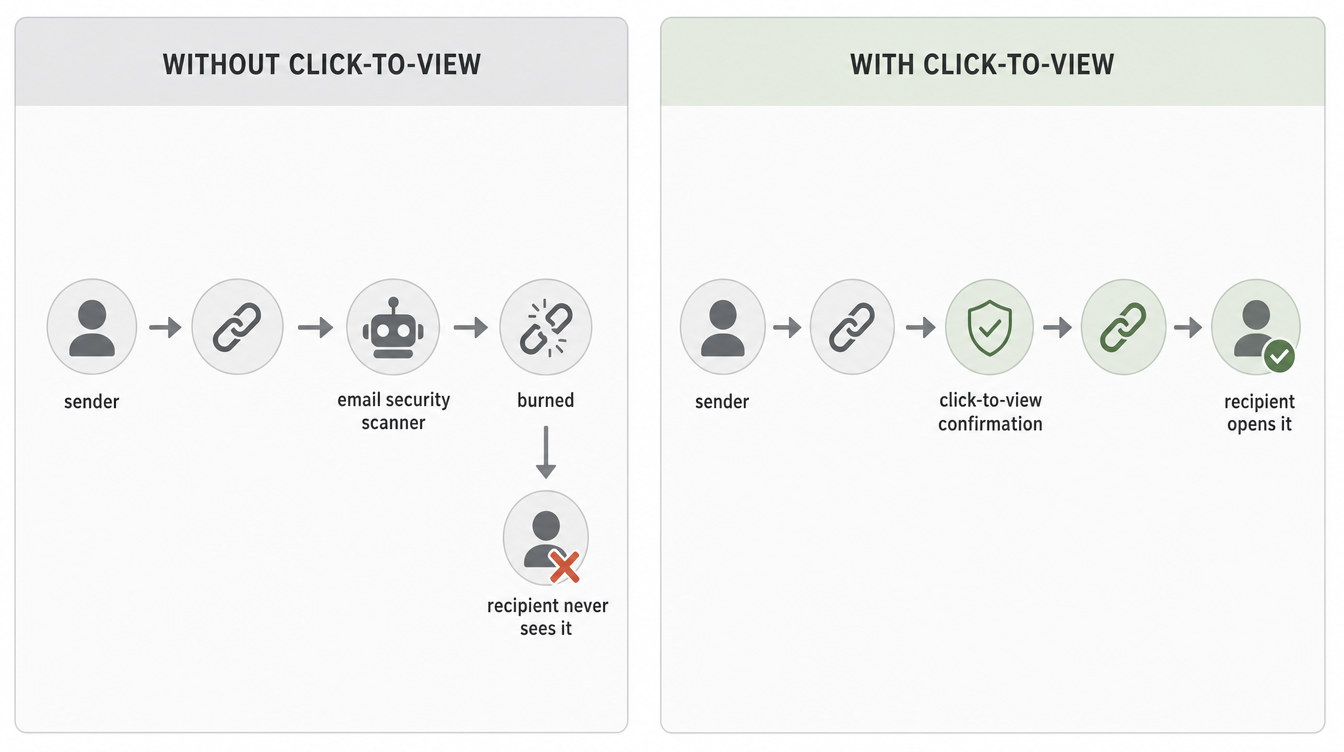
How email security scanners interact with one-time links
Two well-known tools illustrate the pattern, though the exact mechanics differ.
Microsoft Defender Safe Links
According to Microsoft's own documentation, Safe Links rewrites URLs in inbound mail and checks the destination again at the moment someone clicks the rewritten link, a process Microsoft calls time-of-click verification. Microsoft's documented flow starts with a user opening the message and clicking the link, which Safe Links then checks before redirecting. Administrators can exempt trusted domains from rewriting with a "do not rewrite" list or the tenant Allow/Block List, as described in Microsoft's Safe Links setup documentation (as of October 2026).
Proofpoint URL Defense
Proofpoint URL Defense rewrites links in scanned mail to a urldefense.com address, and opens the destination in a sandbox to scan it when the rewritten link is clicked, according to IT department guides on administering the product. Administrators can exclude specific sending domains from rewriting through the Proofpoint admin console, which removes click-time scanning for that domain, a tradeoff worth discussing with IT before applying it broadly.
Beyond these two products, the broader pattern, reported consistently by developers dealing with this exact failure in magic links and one-time links, is that some scanning and preview layers fetch a link automatically before a human ever clicks it, separate from click-time checks. The practical result is the same either way: an automated visit can consume a link meant for one person.
Is this a sign of a hack or a compromised account?
No. An "already viewed" message that appears before the intended recipient opened the link is a sign that a scanning or preview tool visited it first. Nobody intercepted or stole it. It's an expected side effect of how corporate mail security tools and one-time links interact, and it isn't evidence of a breach.
How does a click-to-view confirmation step fix it?
The standard workaround, described independently across developer discussions building their own one-time-link systems, is to stop releasing the secret on the bare page load. Instead, the link opens a page that waits for an explicit action, a button click or form submission, and only that action fetches and burns the secret. A scanner that loads the page satisfies its check without clicking anything, so the link survives until a real person acts on it.
| Delivery method | Can a scanner or bot consume it? | Typical mitigation |
|---|---|---|
| One-time link that burns on page load | Yes, any automated fetch can trigger the burn | Add a click-to-view confirmation step |
| One-time link with click-to-view confirmation | No, scanners load the page but don't click the button | Pair with a short expiry window as a backstop |
| Phone call for the code or link | No | Manual, slower for the recipient, but reliable |
| Short numeric code sent through a second channel | No | Less convenient than a link, but scanner-proof |
| Permanent shared-drive link (not one-time) | Not applicable, nothing to burn | Different risk: the link persists indefinitely instead of expiring |
SparkVault (sparkvault.com) is one example built this way: a Spark holds up to 256,000 bytes of text, a file, or a link for anywhere from 1 minute to 24 hours, and burns on first read. Opening a Spark loads a page that waits for a click before it fetches the secret, so a scanner that only loads the page doesn't use the Spark up. For the deeper picture of how customer-held keys and post-quantum-ready encryption work underneath that, see our customer-held key encryption explainer.
If a link-based tool isn't the right fit, a phone call to read out a code, or a password manager's built-in secure share, avoids the scanning problem entirely because there's no URL for a bot to fetch.
Send a one-time link with a confirmation step: send your first Spark free, or set up a code-based handoff over a call if a link isn't practical for the recipient.
Step by step: sending a one-time link that survives scanning
- Before sending, tell the recipient what to expect, in plain language, so a false "already viewed" doesn't read as an error on their end.
- Use a one-time link tool that requires a click or confirmation before it releases the content. Avoid tools that burn on page load alone.
- Set the shortest practical expiry window for the content, as a backstop in case the link is opened by someone other than the intended recipient.
- Send the link in its own message, apart from other links, so it's easier to identify and resend if something goes wrong.
- If the recipient reports "already viewed" and they haven't opened it, resend immediately and note that their email security tool may have scanned the original link.
What to tell your recipient
A short line before or alongside the link avoids confusion: "This link opens once, and only after you click a confirm or view button on the page, so your email security software scanning it first won't use it up. If you still see 'already viewed' before you've opened it, let me know and I'll resend."
For larger teams
If you're rolling out one-time links across an organization, our secure data sharing checklist covers the wider rollout questions; plan for this specific interaction up front so it doesn't turn into a stream of individual complaints.
- Choose a delivery tool that uses a confirmation step before releasing content, so it degrades gracefully against scanning and doesn't fail without warning.
- Work with IT on allow-listing the sending domain in your organization's own outbound filtering if your team also runs link-rewriting on outbound mail, and discuss the tradeoff of excluding a domain from scanning before doing it broadly.
- If recipients are external and run Microsoft Defender or Proofpoint, you generally can't control their scanning configuration. Document the expected "already viewed" false alarm and the resend process so support staff and account managers have a consistent answer.
- For regulated data such as payment details or client records, pair the confirmation-step link with a short retention and audit policy that records when a link was sent, opened, and expired, independent of whether it was consumed by a scanner or a person.
What to do if a link already got burned by a bot
Resend the content as a new link, and let the recipient know a scanning tool likely consumed the original before they opened it. If your delivery tool has no confirmation step, raise that with whoever manages the tool, since the fix is structural. A sender can't work around it each time.
For sensitive data that shouldn't sit in an inbox at all, see our overview of why email isn't built for sensitive data. A one-time link with a confirmation step still beats leaving the file or text as a permanent attachment, even accounting for an occasional resend.
Frequently asked questions
Why does my secure link say "already viewed" when I never opened it?
Most likely, an email security scanner or link-preview bot opened the link automatically to check it, and the link's one-time mechanism treated that automated visit as the real read. This is routine behavior for tools that scan inbound mail. It doesn't point to tampering.
Is this a sign my account or the link was hacked?
No. It reflects how scanning tools and one-time links interact. Nothing was compromised. If you're unsure, resend the link through the same tool and confirm with the recipient that they received and opened the new one.
Does Microsoft Safe Links or Proofpoint URL Defense open my links automatically?
Microsoft's documentation describes Safe Links as checking a link at the moment a user clicks it, as well as rewriting links during mail flow. Proofpoint URL Defense rewrites links and scans the destination when the rewritten link is clicked, according to IT department guides on the product. Some scanning and preview layers are also reported to fetch links before any human click, which is the behavior that most often causes a one-time link to be consumed early.
How do I stop this from happening again?
Use a one-time link tool that requires a click-to-view confirmation before releasing the content, so an automated page load doesn't trigger the burn. Pair that with a short expiry window, and if your organization controls its own outbound scanning, coordinate with IT on any domain allow-listing so exceptions aren't made ad hoc.
What should I do if a link already got consumed by a bot?
Resend the content and briefly explain why the original link showed as already viewed. For a one-off case, that's usually all that's needed; for recurring reports across a team, treat it as a configuration question for IT and stop resending repeatedly.
If you want a one-time link that asks for a click-to-view confirmation before it opens, send your first Spark free at SparkVault (sparkvault.com).
Sources
- Microsoft Learn: Safe Links overview for Microsoft Defender for Office 365
- Microsoft Learn: Set up Safe Links policies
- Proofpoint: Troubleshooting issues with URL Defense
- Constant Edge: Understanding Proofpoint URL Defense (URL rewriting)
- Inventive HQ: How to set up URL Defense in Proofpoint
- better-auth GitHub issue: a consent-page step for corporate email URL scanners
- SparkVault: how Sparks work